
Work you can take with you.
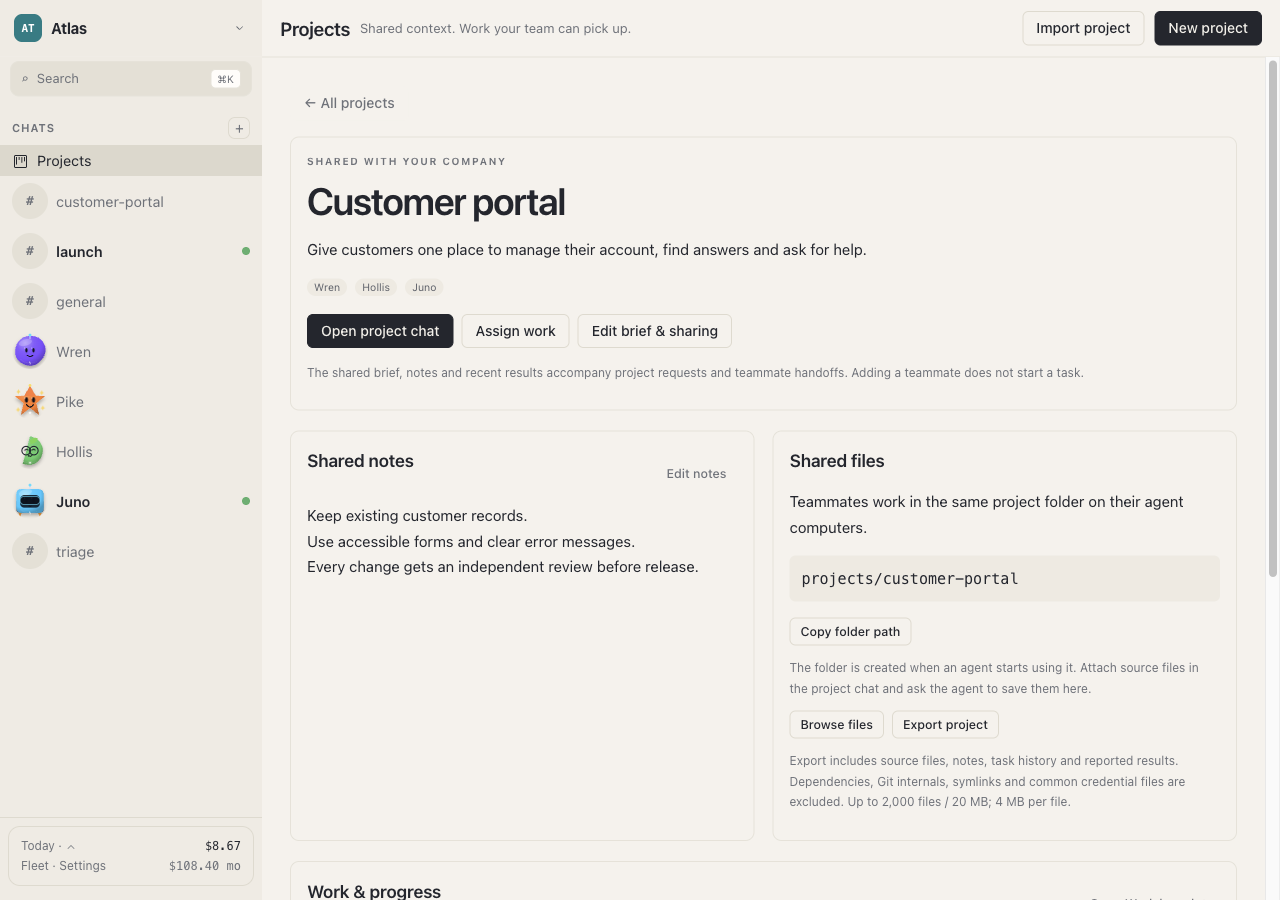
Agents can create and edit files in their environment. Shared project folders let teammates work with the same output, and project export helps you take the work elsewhere.
Product / Agent computers
Your agents need more than a text box. Zipper gives them a Linux environment for files, commands, and tools—and gives you a way to see the work.
You
Conversations, projects,
progress, and approvals
Your chosen host
Linux tools and commands
Company project files
Your connections
Provider requests
Tools you enable
Conceptual overview. Connected providers and tools receive the information needed for their requests.
Agents can create and edit files in their environment. Shared project folders let teammates work with the same output, and project export helps you take the work elsewhere.
Use commands and development tools inside an agent computer. Inspect the files and running work when you need more detail than a chat update.
Background work depends on the host remaining awake and connected. If you need work to continue while your laptop is off, choose a host that can stay online.
A shared place to build
Use a project folder for shared work and have agents include paths in their handoffs. Keep private agent work separate from the project output you intend to share.
Zipper can export a project with its notes, files, task history, and reported results. Exports exclude items such as dependencies, Git internals, and common credential files; review what you share.
Know what runs where
Start with something real
Choose your desktop preview, understand the setup, and give your team a clear first project.